
From Dual Accounts to Easy Chat Transfers: WhatsApp Rolls Out New Features for iPhone
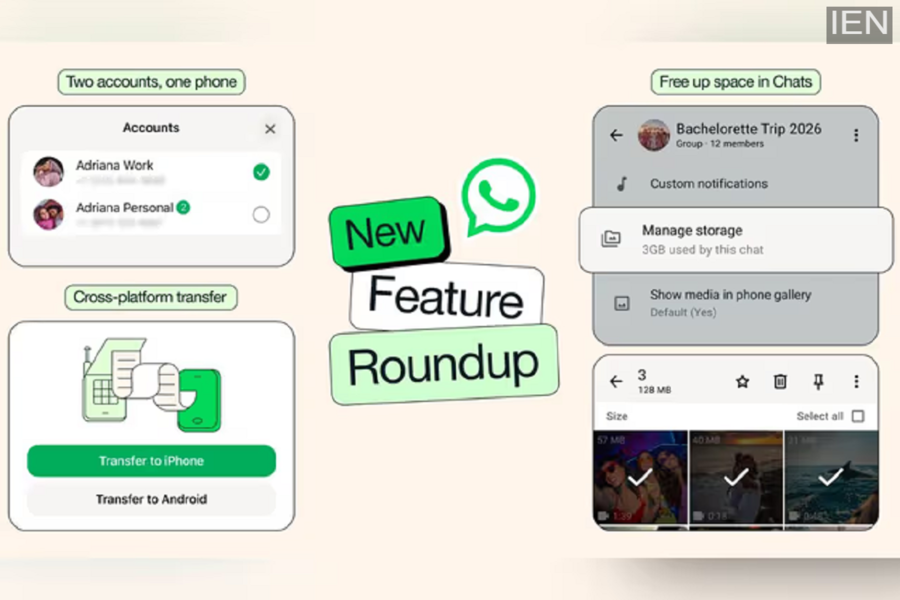
To further enhance the user experience, WhatsApp has rolled out a host of new features. With these new additions, users will now be able to manage their chats more efficiently and with greater ease.
WhatsApp has released several new features for its users, making the app smarter and more user-friendly than ever before. Thanks to these features, managing storage and transferring chats between Android and iPhone devices has become significantly easier, while the integration of AI has also improved the overall chatting experience. Most notably, iPhone users can now run two separate WhatsApp accounts on a single device—a capability that was previously available exclusively on Android. According to WhatsApp, these features are being rolled out in phases and will soon be available to all users.
Two WhatsApp Accounts on a Single iPhone
iPhone users can now operate two distinct WhatsApp accounts on a single device—a functionality previously limited to Android. This eliminates the need to carry two separate phones for work and personal chats. According to the company, a profile picture will be displayed at the bottom of the app interface, ensuring you always know exactly which account you are currently using. This also makes switching between the two accounts incredibly simple.
Upgrading to a New Phone Just Got Easier
For WhatsApp users, switching to a new phone is now easier than ever before. Previously, users often worried about losing their chat history when migrating from Android to iPhone or vice versa. To address this, WhatsApp has updated its cross-platform transfer feature, allowing you to seamlessly transfer your entire chat history—including photos and videos—to your new device. While this capability was previously restricted to transfers within the same operating system, you can now securely migrate all your chats to a new device in just a few simple steps.
Freeing Up Storage Space Is Now Simpler
If your phone’s storage tends to fill up quickly, WhatsApp is making it even easier to manage. Users can now navigate into any specific chat to easily identify and delete large files without having to delete the entire chat conversation. To do this, simply tap on the chat’s name and select the “Manage Storage” option. From here, you can remove only media files—such as photos and videos—while your chat history remains secure.
Sticker Suggestions While Typing
WhatsApp is making it even easier to use stickers. Now, as soon as you type an emoji, the app will automatically suggest stickers related to it. Users can replace an emoji with a sticker with just a single tap, making it easier to express their feelings more effectively.
Photo Editing Made Easy with Meta AI
It is now even simpler to edit photos on WhatsApp before sending them. Users can now modify photos directly within the chat using Meta AI. With this feature, you can change a photo’s background, remove unwanted objects, or apply various creative styles. However, according to the company, these Meta AI-related features will not be immediately available to all users; instead, they will be rolled out gradually over time.
Replying Made Easier with AI Writing Help
WhatsApp’s AI Writing Help feature has received an upgrade. It can now automatically suggest replies based on the context of your chat. If you are unsure of how to respond, this feature will assist you in finding the right words. Notably, WhatsApp has clarified that this feature operates while fully safeguarding your privacy.
