
WhatsApp Gets New Year 2026 Stickers, Now Send Fun Wishes to Friends Without Typing Messages
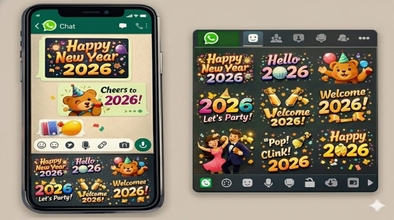
WhatsApp Happy New Year 2026 Stickers: WhatsApp has launched a special Happy New Year 2026 sticker pack for its users, allowing them to send New Year wishes to their friends and relatives without typing long messages.
WhatsApp Happy New Year 2026 Stickers: The year 2025 is about to end, and the new year 2026 is just around the corner. To make the New Year celebrations even more special, WhatsApp has introduced a wonderful gift for its users. Now, users don't need to type long messages or use any third-party app to send New Year wishes to their friends and relatives. WhatsApp has launched a new sticker pack specifically called "Happy New Year 2026," which users can send in chats and also use in their status updates.
What is WhatsApp's Happy New Year 2026 Sticker Pack?
WhatsApp has launched the Happy New Year 2026 sticker pack especially for its users. This new animated sticker pack comes with a total of 14 stickers and its file size is only 488KB. If you don't see this sticker pack yet, simply update your WhatsApp from the Google Play Store or Apple App Store. After the update, you will find these stickers in the Sticker section of your chat.
How to Send Happy New Year 2026 Stickers on WhatsApp
- First, open your WhatsApp.
- Select the chat in WhatsApp where you want to send the sticker.
- Then tap on the sticker icon in the message bar.
- Search for the "Happy New Year 2026" sticker pack at the bottom of the sticker tray.
- Then open the sticker pack, select your favorite sticker, and tap on it to send.
How to Add Happy New Year 2026 Stickers to Your Status?
To add New Year stickers to your WhatsApp status, you first need to select a photo for your status. Then, click on the sticker option at the top and choose your preferred sticker from the New Year 2026 sticker pack to post it on your status.
You can also create New Year images with Meta AI.
If you want to create a custom image for the New Year, you can do so with the help of Meta AI. To do this, open any chat on WhatsApp. Then, tap on the paperclip icon and select the AI Image option. After that, enter a prompt like "Happy New Year." The system will automatically generate several AI-created images, from which you can choose your favorite and send it directly in the chat.
