
Voter List: Is your name on the new voter list? Check it on your phone using these steps..
Following the Special Intensive Revision (SIR) conducted by the Election Commission, the draft voter lists for West Bengal, Rajasthan, Goa, Lakshadweep, and Puducherry were released on Tuesday. If you want to check whether your name has been removed from the voter list, you can easily do so on your phone.
You will need to follow a few simple steps. After that, you can download the draft voter list and check if your name is included.
If your name has been removed from the voter list, you can also fill out Form 6 online to get your name added back to the list. Let's understand all the steps in detail.
How to Check Your Name in the Voter List
To download the new voter list on your phone, first, you need to search for "Electoral Roll" in your browser.
Click on the first result, "Voter Rolls - Voter’s services Portal".
On the page that opens, fill in the necessary details, such as your state, Year of Revision (2025), Roll Type (Final Roll 2025), your district, assembly constituency, and language.
Then, fill in the captcha correctly.
After that, select all the options in "Part no. and Part name" at the bottom of the page.
Then, click on "Download Selected PDF" to download the voter list.
After this, you can search for your name in the voter list. If your name has been removed from this list, you can fill out Form 6 to get your name added back. You can easily do this from home on your phone through the Election Commission's website. Let's understand the online process in detail.
Documents Required to Fill Form 6
To add your name to the voter list, you can fill out Form 6 on the Election Commission's website. For this, you will need to have copies of your identity documents, such as an Aadhaar card, PAN card, or passport, ready.
In addition, you can use a copy of your ration card, electricity bill, or bank passbook as proof of address. For proof of age, you will need a birth certificate or your 10th-grade mark sheet.
How to fill Form 6 online?
To fill Form 6 online, you first need to:
Go to the official Voters Service Portal.
Once on the official site, click on 'Sign Up' and register yourself by filling in the required details.
Then, log in to the Voters Service Portal using your mobile number and password.
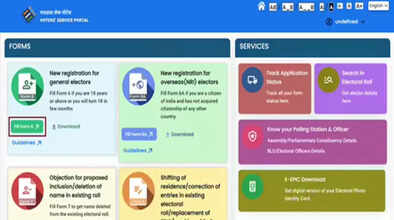
Now, click on the 'Fill Form 6' button in the 'Forms' option.
After that, fill in all the necessary details in Form 6.
Then, upload all the required documents to the form.
After that, click on the 'Preview and Submit' button.
Check all the information carefully, and if everything is correct, click on Submit.
After this, you will receive an acknowledgment number, which you can use to check the status of your application. If all your details are found to be correct, your name will be added to the final voters' list.
How to check the application status?
If your name is removed from the voters' list and you fill out Form 6 to get your name added, you will receive an acknowledgment number after submitting the form. You can use this to track the status of your application. To do this, you need to:
Log in to the official Voters Service Portal using your ID and password.
Then click on 'Track Application'.
Enter your acknowledgment number, select your state, and click on Submit.
The status of your Form 6 will then be displayed on the screen.
Disclaimer: This content has been sourced and edited from Navbharat Times. While we have made modifications for clarity and presentation, the original content belongs to its respective authors and website. We do not claim ownership of the content.
