
Tips: Share your phone number in seconds using the new Aadhaar app; find out how the 'Contact Card' feature works..
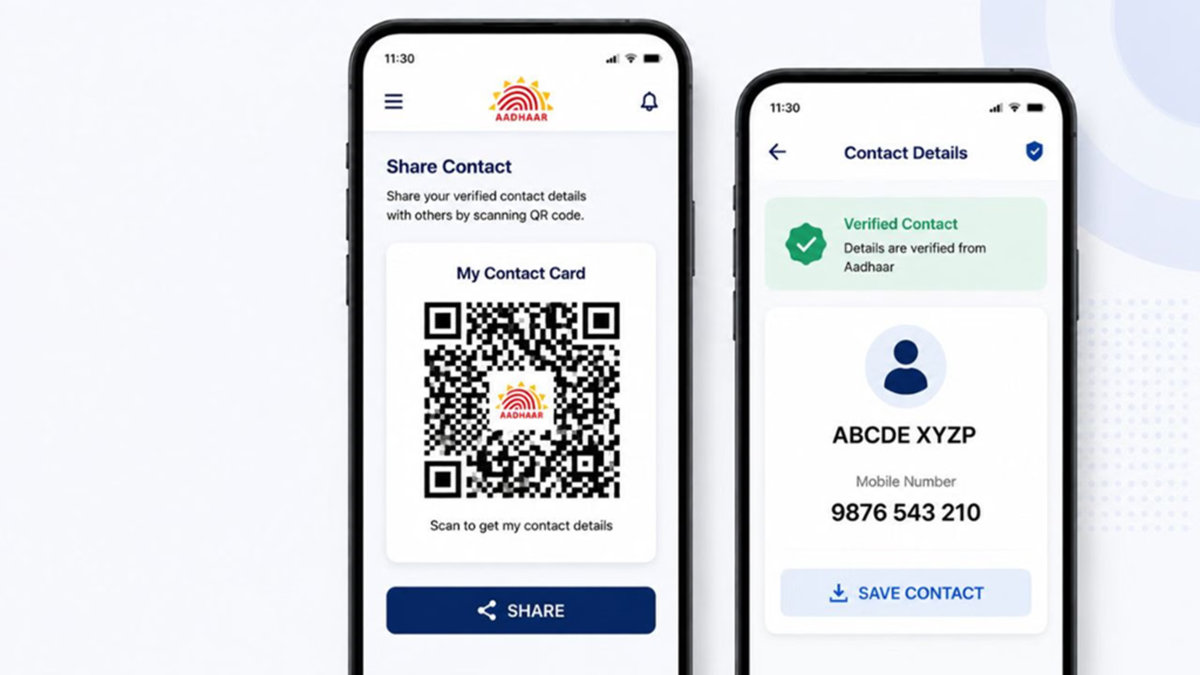
The new Aadhaar App offers several features that were not available in the older version. You can now update your address, phone number, and email ID from the comfort of your home using the app. Previously, one had to visit an Aadhaar center for these services, but now they are available directly within the app. Another notable feature allows you to easily share your name and phone number with others.
What is the Aadhaar App's 'Contact Card' feature?
The new Aadhaar App includes a 'Contact Card' feature that lets you share your contact details without having to speak or type them out. This feature generates a digital contact card using the verified name and registered mobile number from your Aadhaar records. Its key advantage is that the information is sourced directly from the Aadhaar database, eliminating the risk of saving incorrect numbers or misspelling names. In this article, we explain how to generate your contact card and share it when needed. Let's find out...
How to generate your Contact Card
First, download the new Aadhaar App from the Google Play Store or Apple App Store.
Open the app and log in using your 6-digit PIN or fingerprint.
Go to the 'Services' section located at the bottom of the home screen.
Under 'Other Services', select the 'Share Contact' option.
Tapping this will generate a secure QR code for you.
The other person simply needs to scan this QR code with their phone. Upon scanning, your contact details will appear on their screen, allowing them to save the information to their phone with a single tap.
Download the Contact Card to your phone
To download the contact card to your phone, select the 'Download Contact Card' option. Once selected, a QR code will be saved to your phone's gallery.
You can also use this QR code to share your contact details. You can send the QR Code to people who are not physically present.
A key feature of the contact card is that it remains useful even when the other person is not right next to you.
Once the QR Code is generated, a 'Share' option appears on the screen. You can use this to send your digital contact card via WhatsApp, SMS, or any messaging app. The recipient can easily save your information by scanning the QR Code.
The contact card feature functions much like a traditional visiting card.
What information can be shared?
Only essential details—such as your name, mobile number, email ID, and organization name—can be shared via the contact card. These details cannot be altered, which minimizes the risk of sharing fake information or incorrect contact details.
You can also control exactly which details are shared by using the 'Edit Fields' option; only the information corresponding to the selected checkboxes will be included in the contact card.
Disclaimer: This content has been sourced and edited from Amar Ujala. While we have made modifications for clarity and presentation, the original content belongs to its respective authors and website. We do not claim ownership of the content.
