
Tech: What is KYM, the system that can detect fake phones with a single SMS? Understand how to use it..
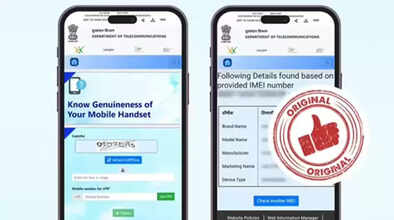
If you're confused about whether a smartphone is genuine or fake when buying it, the Department of Telecommunications (DoT) has introduced a very easy way to help you.
You can quickly find out if a phone is genuine or fake through KYM. All you have to do is send an SMS, and you'll instantly receive the necessary details about the device. This feature is especially useful when you're buying a second-hand smartphone. Let's understand in detail what KYM is and how you can use its SMS service.
What is KYM?
KYM, or Know Your Mobile, is a government verification system of the Department of Telecommunications (DoT). With its help, you can find out whether a phone is genuine, fake, stolen, or blacklisted, simply by using its IMEI number. This allows people to easily avoid buying fraudulent or stolen devices.
How to detect a fake phone via SMS
You can also use DoT's KYM service via SMS. This is especially beneficial for those who don't know how to access smartphones or apps and can quickly find out the authenticity of a phone with just one SMS. To do this:
Open the messaging app on your phone.
Then type KYM followed by a space.
After the space, enter the IMEI number of the phone you want to check.
Then send the message to 14422.
What information will you receive?
A short while after sending the SMS as described above, you will receive a reply in the same message thread. This will include details about the device associated with the IMEI number. If the phone you are inquiring about is genuine and not stolen, you will receive information about the phone's Marketing Name, Brand, Model, Manufacturer, and Device Type.
If the phone is stolen or blacklisted, you will also receive immediate notification in the message. This way, you can find out the authenticity of any phone with just one SMS.
Where to find the IMEI number
You can find the IMEI number of any smartphone on the phone's box or in the settings under "About Device." Alternatively, you can also find your phone's IMEI number by dialing *#06#.
Disclaimer: This content has been sourced and edited from Navbharat Times. While we have made modifications for clarity and presentation, the original content belongs to its respective authors and website. We do not claim ownership of the content.
