
Tech Tips: Your smartphone won't be able to spy on you; turn this option on in Settings..
Do you also feel that your smartphone is listening to your conversations? Has it ever happened to you that you talked about something, and shortly after, you started seeing advertisements and reels related to that same thing? If yes, then you also need to activate a secret setting on your smartphone. Turning on this special setting will disable all the sensors that might be spying on you. The amazing thing is that you can turn all the phone's sensors, such as the microphone and camera, on or off with just one button. This way, you can keep your privacy completely under control. Note that to enable this setting, you will have to access a secret menu on your phone. Let's talk about this in detail.
What is the Sensor Off setting?
In today's digital world, where people are becoming more aware of their privacy, a hidden setting has been made available in Android smartphones. After enabling this feature called "Sensor Off," the user can turn all the phone's sensors on or off with the help of a single button. A phone has many types of sensors that help your phone function smartly, but many apps also use them in the background. By turning on the "Sensor Off" setting, you can take control of all your phone's sensors.
Advantages of enabling the Sensor Off setting
The advantage of enabling the Sensor Off setting is not just that you can turn all your phone's sensors on or off at your will. In fact, using it can also improve your privacy and battery life. Many apps on our phones collect data in the background by using the phone's sensors. This compromises both your privacy and your phone's battery life.
First, enable Developer Options.
To enable the Sensor Off setting, you first need to enable Developer Options on your phone. This is very easy. To do this, first go to your phone's settings and then:
Scroll down and tap on About Phone. Next, tap the Build Number option at the bottom of the screen 7-10 times repeatedly.
This will enable the Developer Options menu on your phone.
After this, you will see the Developer Options menu in the About Phone menu.
How to enable the Sensor Off setting:
Once the Developer Options menu is enabled, tap on that option.
Then, in the Quick Settings Developer Tiles section, turn on Sensor Off.
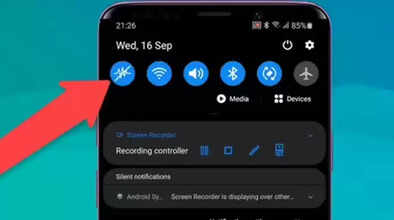
After this, you will see an option called Sensor Off in your phone's quick settings. With this, you can turn off or on all the phone's sensors at once.
If you don't know, the quick settings are the settings that appear when you swipe down from the top of your phone's home screen. You will see the Sensor Off button there. Quick settings refer to the menu where you usually turn on settings like Wi-Fi and Bluetooth on your phone.
Disclaimer: This content has been sourced and edited from Navbharat Times. While we have made modifications for clarity and presentation, the original content belongs to its respective authors and website. We do not claim ownership of the content.
