
Tech Tips: How Does Quick Share Work? Learn How to Enable It on Your Smartphone..
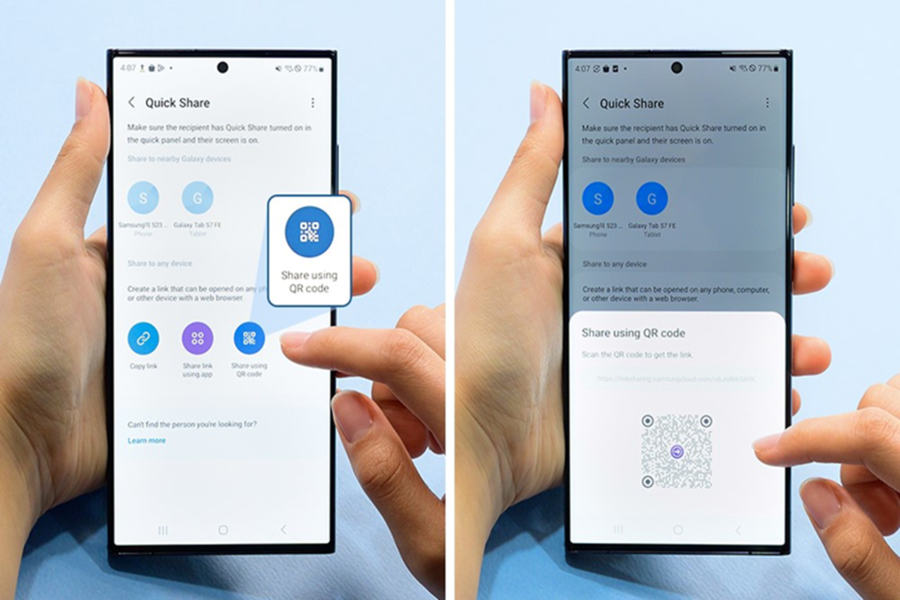
In today's era, smartphones are no longer limited to just calling and messaging. People now routinely share 4K videos, high-resolution photos, documents, and large app files. However, platforms like WhatsApp, email, and many others often compress files, resulting in a reduction in their quality. In such scenarios, Android's Quick Share feature proves to be an excellent option. This feature allows for the transfer of large files in just a few seconds, even without an internet connection. This is precisely why it is often referred to as Android's equivalent of AirDrop.
**What is Quick Share?**
Quick Share is Android's built-in file transfer system. It enables users to share photos, videos, documents, and other large files at high speeds. Initially, this feature was exclusive to Samsung devices. However, in 2024, Google merged Nearby Share with Quick Share. Following this merger, it became the default file-sharing feature for almost all Android smartphones.
Quick Share utilizes both Bluetooth and Wi-Fi Direct technologies. First, Bluetooth identifies and establishes a connection between the two devices; subsequently, a high-speed link is established via Wi-Fi Direct. Consequently, its transfer speeds can reach up to 200 MB per second in many instances. Most notably, Quick Share does not compress files; this means that photos and videos are transferred in their original, uncompromised quality.
**Why is it special for Android users?**
The greatest advantage of Quick Share is its simplicity. It requires no downloading of third-party applications. Most smartphones running Android 6.0 Marshmallow or a newer version support this feature. This implies that the capability is available on the majority of Android phones launched since 2015.
Furthermore, this feature now functions seamlessly with Windows laptops and Google Chrome. Additionally, with the Pixel 10 series, file-sharing capabilities with iPhones have been introduced through AirDrop support.
**How to enable Quick Share?**
Before utilizing Quick Share, the feature must be activated on both participating devices. To do this, open the Quick Settings Panel and tap on the Quick Share icon. If the icon is not visible, you can enable it by navigating to Settings > Google > All Services > Devices and Sharing > Quick Share.
Additionally, ensure that Bluetooth is turned on, and confirm that one device is in Send Mode while the other is in Receive Mode.
**How to Share Large Files**
To send a file, first open the photo, video, or document you wish to share. Next, tap the Share button and select the Quick Share option.
A list of compatible devices located nearby will now appear. Select the specific device to which you want to send the file.
In some instances, a PIN may be displayed for security purposes. Once the PIN matches and the receiver taps the "Accept" button, the file transfer will begin.
**Works on PCs and Laptops Too**
Quick Share is not limited to smartphones alone; Android users can also utilize it on Windows PCs and laptops. To do so, you need to install the Google Quick Share app. Once installed, you can easily transfer photos, videos, and documents between your mobile device and computer.
This feature is particularly useful for individuals who frequently transfer large files between their mobile devices and laptops.
Disclaimer: This content has been sourced and edited from Amar Ujala. While we have made modifications for clarity and presentation, the original content belongs to its respective authors and website. We do not claim ownership of the content.
