
Tech: Is it real or an AI creation? Catch the "lies" in photos and videos in minutes with Google Gemini..
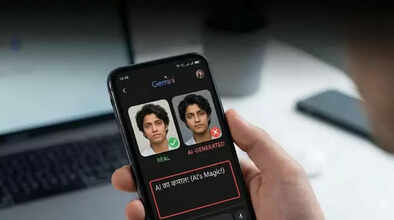
Creating content with AI has become not only easy but also incredibly advanced, which is why it's becoming increasingly difficult to distinguish between original and AI-generated content. From deepfakes to AI-edited images, the internet is flooded with content that is not easy to verify.
To address this problem, Google has introduced a content transparency tool that helps users differentiate between AI-generated and original content. Using the Gemini app, anyone can now check whether a video or image was created or edited using Google's AI. This is simple and made possible by Google's watermarking technology, SynthID, which embeds hidden markers in AI-generated content. This powerful technology can then be used to verify the authenticity of online content.
To find out if a photo or video was created using AI, you will need the Google Gemini app and the file you want to verify. Open the Gemini app; the verification feature is available in all supported languages and countries, making it accessible to users worldwide. For best performance, ensure you have the latest version of the app installed on your phone.
Next, upload the image or video you want to verify to the Gemini app. For videos, the file can be up to 100MB and up to 90 seconds long. The upload process is quick and straightforward, similar to how you attach files in a messaging app.
Ask Gemini the question.
Once your file is uploaded, simply ask Gemini a direct question, such as "Was this created using Google AI?" or "Is this AI-generated?" Gemini scans the uploaded content for the SynthID watermark, which is seamlessly embedded in both the audio and visual tracks of the video.
The app uses its reasoning capabilities to provide you with information about what it detects. For videos, Gemini can pinpoint exactly which segments contain AI-generated elements. For example, it might respond: “SynthID detected in the audio between 10 and 20 seconds. No SynthID detected in the visuals.” These details help users understand which parts of their content were created or modified using AI.
Disclaimer: This content has been sourced and edited from TV9. While we have made modifications for clarity and presentation, the original content belongs to its respective authors and website. We do not claim ownership of the content.
