
Tech Explained: What is this black dot near the iPhone camera? Find out here..
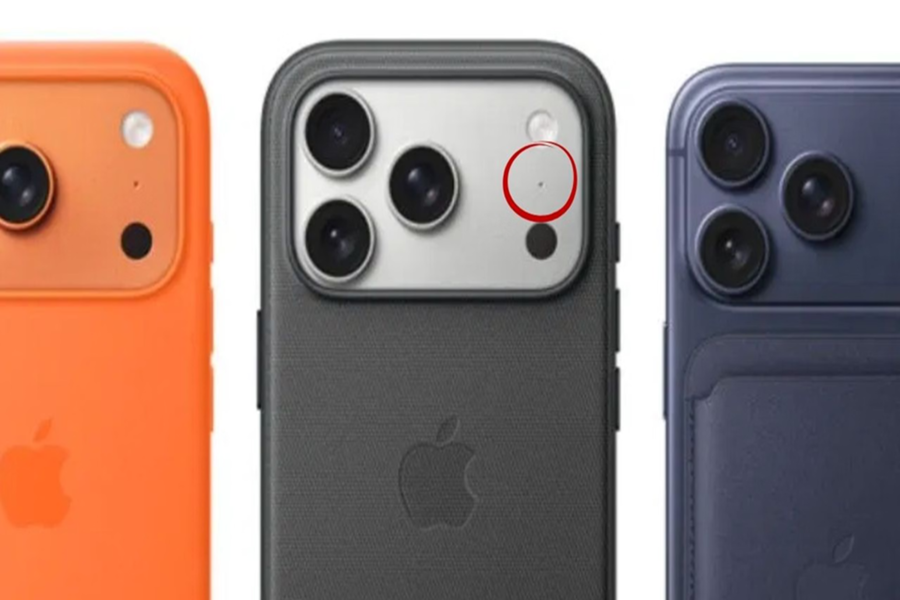
If you're using an iPhone 12 Pro or any subsequent Pro model, you've probably noticed a small black dot near the cameras on the back of your phone. It doesn't look like a lens or a flash. Strangely, Apple doesn't talk about this dot. It's not mentioned in any events, nor is it featured in any major promotional materials. So the question arises: if it's so insignificant, why is it included in every Pro model of the iPhone?
Many people think it might be an extra camera, some believe it's part of the design, and some users even suspect it's a hidden sensor. The interesting thing is that you can't turn it on or off. Not in the camera app, not in the settings.
Delivers stunning photos even in the dark
But you definitely feel its effect. When your iPhone focuses quickly in low light, when night mode portraits suddenly become much clearer, or when an AR app scans your room in just a few seconds – all of this happens automatically, without pressing any buttons. It's as if some invisible force is working in the background.
What is this mysterious black dot?
This black dot is none other than a LiDAR (Light Detection and Ranging) sensor. This is the same technology that NASA uses in its satellites and car companies use in self-driving cars for navigation. This black dot is actually a laser emitter. Its job is to emit laser beams, which are invisible to the naked eye. These beams bounce off objects in front of you and return. The iPhone's processor calculates how long it takes for the light to return. This allows the phone to create an accurate 3D map of the room or space around you.
What is the purpose of the LiDAR sensor in the phone?
The LiDAR sensor greatly assists in low-light photography. Its biggest advantage is that it can "see" things even in the dark. That's why night mode portrait photos turn out so well at night. If you want to see how a new sofa would look in your room without leaving your house, LiDAR helps display it in the exact right place. This sensor is also a boon for visually impaired people, as it can use the Magnifier app to tell them who is standing nearby or how far away a wall is.
No worries if you don't have it
While it's not an essential feature, it's a nice-to-have feature if your phone has it. If you don't take portrait photos in low light or use AR apps frequently, you won't notice much benefit from LiDAR. iPhones without LiDAR can still take good photos and run AR apps; the experience might just be slightly different.
Disclaimer: This content has been sourced and edited from Amar Ujala. While we have made modifications for clarity and presentation, the original content belongs to its respective authors and website. We do not claim ownership of the content.
