
New Aadhaar App Gains Massive Popularity: Update Mobile Number, Address and Verify Identity with QR Code
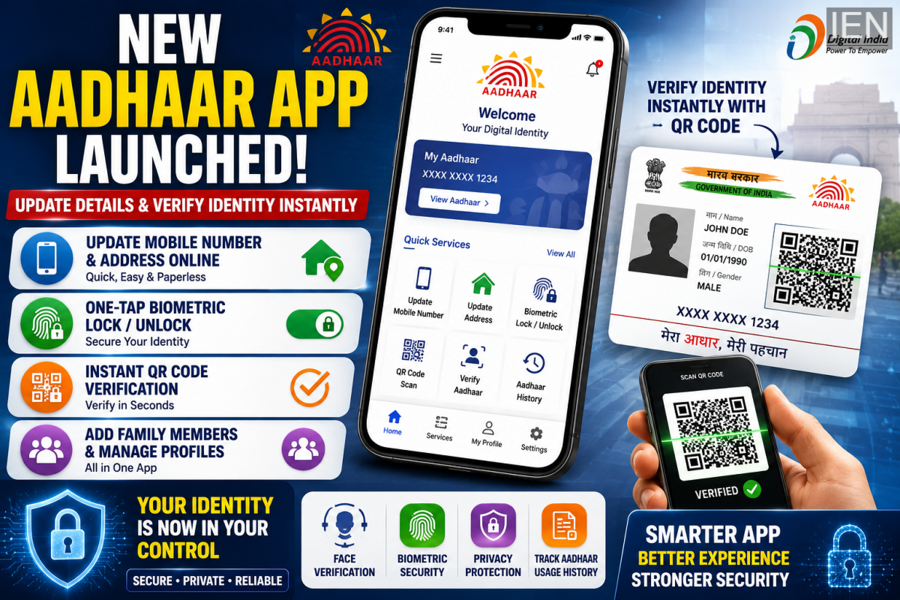
India's digital identity ecosystem is rapidly evolving, and the newly launched Aadhaar app is emerging as one of the country's fastest-growing government-backed digital platforms. Designed to make Aadhaar-related services simpler, safer, and more accessible, the application has already crossed more than 21 million downloads within just three months of its launch.
The app introduces several modern features that allow users to manage their Aadhaar information directly from their smartphones. From updating personal details to securing biometric data and verifying identity through QR codes, the platform aims to make Aadhaar services more convenient than ever before.
New Aadhaar App Sees Strong Adoption
The new Aadhaar application was introduced by the Unique Identification Authority of India (UIDAI) to modernize digital identity management.
According to official figures, millions of users have already adopted the platform, making it one of the most widely downloaded government service applications in recent months.
The growing popularity highlights increasing demand for secure and paperless digital identity solutions.
Update Mobile Number and Address from Home
One of the most useful features of the new Aadhaar app is the ability to manage personal information without visiting a physical Aadhaar center.
Users can now update:
-
Mobile number linked with Aadhaar
-
Residential address
-
Other profile-related information
The feature significantly reduces paperwork and saves time for citizens.
Reports indicate that millions of users have already used the application to update their mobile numbers and addresses through the digital platform.
Moving Beyond the Old mAadhaar App
The new Aadhaar app is designed as a next-generation upgrade to the existing mAadhaar application.
While mAadhaar offered basic Aadhaar-related services, the new platform introduces:
-
Improved user interface
-
Enhanced security features
-
Better privacy controls
-
Faster verification mechanisms
-
Simplified identity-sharing options
The transition reflects UIDAI's focus on creating a more secure and user-friendly digital ecosystem.
What Is the New Aadhaar App?
The new Aadhaar app transforms a smartphone into a secure digital identity platform.
Instead of sharing a complete Aadhaar document every time verification is required, users can now selectively share only the information needed for a specific purpose.
This approach helps improve privacy while simplifying identity verification.
QR Code-Based Instant Verification
One of the standout features of the new Aadhaar app is QR code verification.
Users can generate and share QR codes that allow authorized entities to verify identity instantly.
Benefits include:
-
Faster verification process
-
Reduced paperwork
-
Better privacy protection
-
Improved user convenience
The system is expected to be useful across multiple sectors, including offices, housing societies, hotels, and service providers.
Selective Information Sharing
The app allows users to control the information they share during verification.
Instead of revealing the entire Aadhaar profile, users can choose specific details such as:
-
Name
-
Photograph
-
Age
-
Gender
-
Mobile number
-
Address
This selective-sharing feature enhances privacy and minimizes unnecessary exposure of personal information.
Biometric Lock and Unlock in One Click
Security remains one of the key priorities of the new Aadhaar platform.
The app enables users to:
-
Lock fingerprint authentication
-
Unlock biometric access
-
Manage Aadhaar security settings
This feature helps prevent unauthorized use of biometric information and gives users greater control over their digital identity.
Track Aadhaar Usage History
Another useful feature is the ability to monitor Aadhaar usage.
Users can check:
-
When Aadhaar was used
-
Where verification took place
-
Authentication history
This transparency allows individuals to stay informed about how their Aadhaar information is being accessed.
Face Verification Support
The application also supports face authentication technology.
Face verification offers:
-
Faster identity confirmation
-
Contactless verification
-
Additional security layer
The feature is expected to improve authentication experiences across various digital and physical services.
Add Family Members on the Same Device
The app allows users to manage Aadhaar profiles for family members as well.
This feature can be particularly useful for:
-
Parents managing children's Aadhaar records
-
Senior citizens
-
Family account management
Multiple Aadhaar profiles can be accessed from a single device while maintaining security protocols.
How to Download the New Aadhaar App
For Android Users
-
Open Google Play Store.
-
Search for "Aadhaar."
-
Verify that UIDAI is listed as the developer.
-
Download and install the application.
-
Complete mobile verification.
For iPhone Users
-
Open the Apple App Store.
-
Search for "Aadhaar."
-
Select the official UIDAI application.
-
Install the app.
-
Complete registration and verification.
How to Switch from mAadhaar to the New Aadhaar App
Users currently using mAadhaar can move to the new platform by following these steps:
-
Download the new Aadhaar app.
-
Grant required permissions.
-
Enter the 12-digit Aadhaar number.
-
Verify the Aadhaar-linked mobile number through OTP.
-
Complete face authentication if required.
-
Set a secure PIN.
-
Enable biometric lock and security features.
Once the setup is complete, users can access all available digital services through the new application.
Final Thoughts
The new Aadhaar app represents a major step forward in India's digital identity ecosystem. By combining QR-based verification, biometric controls, privacy-focused information sharing, and profile management tools, UIDAI has created a platform designed for modern digital governance.
As adoption continues to grow, the application is expected to become a key tool for secure identity verification, document management, and Aadhaar-related services across the country.
