
Need to Change Your Bank Account on UPI? Here’s How to Do It in Minutes—Without Creating a New ID
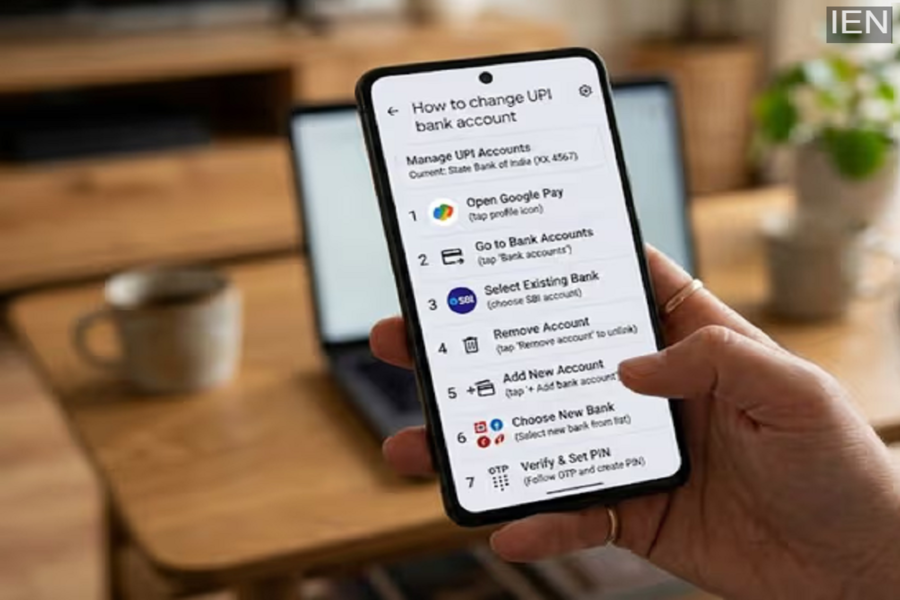
How to change your bank account on UPI: In today's world, we all rely on UPI for our financial transactions. It often happens that we close an old bank account or open a new one at a different bank to take advantage of better services. In such instances, we also need to update our bank account details within our UPI apps (such as PhonePe, Google Pay, or Paytm).
The good news is that you absolutely do not need to create a new UPI ID for this process. You can simply link your new bank account to your existing UPI ID. Let's walk through the complete procedure and discuss some important precautions to keep in mind.
How to Link a New Bank Account?
When you navigate to add a new account within your UPI app, the app automatically detects and displays a list of all your active bank accounts linked to your registered mobile number. All you have to do is select your new bank from that list. As soon as you select it, it gets linked to your existing UPI ID. Note that in some cases, you may be required to set a new UPI PIN specifically for the new account.
Why Is It Important to Remove the Old Account and Set a Default?
After linking a new account, the most crucial step is to designate it as your 'Default Account' (or Primary Account). Simply go to the bank settings within your app and select your new account as the default option. By doing this, whenever you send money to someone or receive funds from others, the transactions will be debited from—and credited to—this new account directly. Additionally, if you have closed your old bank account, make sure to manually delete it from the app yourself, as the app does not remove it automatically.
Will This Affect Automatic Payments (Mandates)?
If you have set up 'Autopay' for recurring expenses—such as electricity bills, OTT subscriptions, or other services—it is highly advisable to review these settings once you have changed your bank account. Some Autopay mandates may remain linked to your old bank account, which could result in failed payments. Therefore, it is prudent to renew or reconfigure those mandates in accordance with your new account details.
What precautions should you take to stay safe?
Use only genuine apps: Always use official and trusted UPI apps downloaded exclusively from the Play Store or App Store. Do not place your trust in any unknown or third-party applications.
Avoid public Wi-Fi: Refrain from making changes to your bank account or UPI settings while connected to free Wi-Fi networks at railway stations, cafes, or any other public venues. Doing so exposes you to the risk of hacking.
PIN and Verification: Never share your UPI PIN with anyone, and do not blindly approve any unfamiliar verification requests that appear on your app.
Always keep your UPI app updated, and periodically verify that it is linked only to the bank accounts you are actively using. This will ensure that your digital transactions remain seamless and secure.
