
McLaren F1 racing car to appear in Google Maps; here’s how to change your navigation icon..
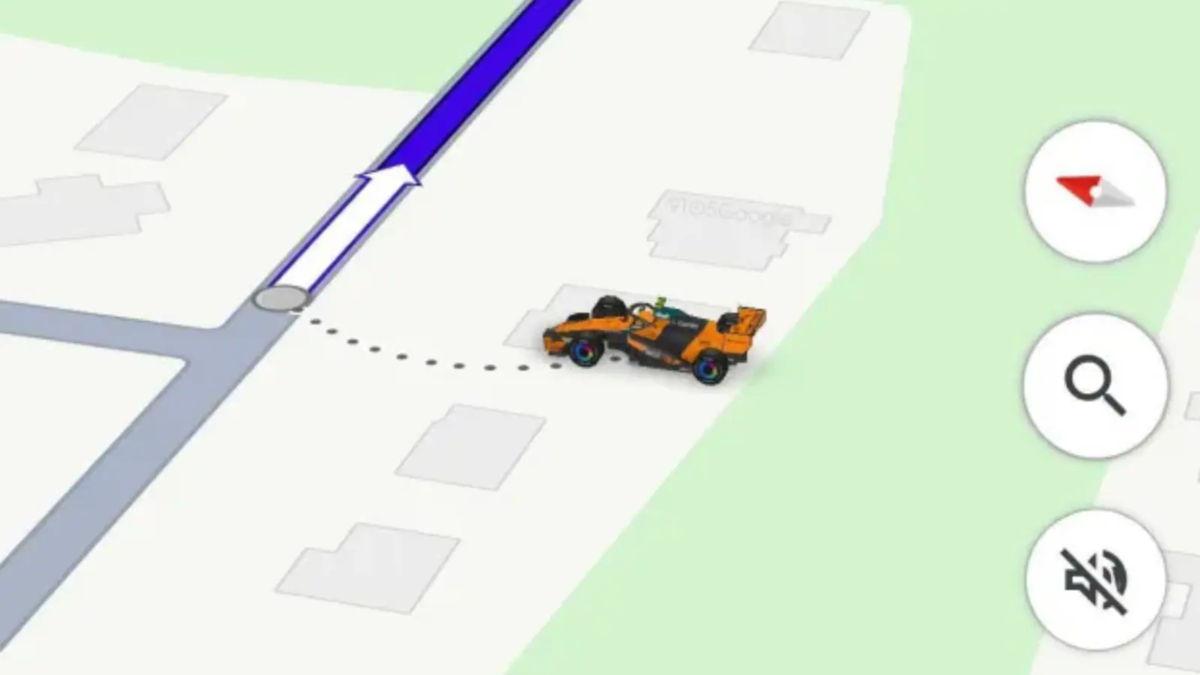
A new and fun feature has arrived for Google Maps users. During navigation, users can now replace the standard blue arrow—which typically indicates their position—with an icon of a McLaren F1 racing car. This feature is likely to be particularly appealing to Formula 1 racing fans.
Available for a limited time
Google has introduced this new driving avatar as part of a partnership with McLaren Racing. It allows users to swap the standard location-indicator icon on the map for an orange McLaren F1 car.
This feature is linked to the Formula 1 race taking place in the United States. According to the company, users will be able to access this special avatar until November 23, 2026, after which the option may be removed.
How to change the car icon in Google Maps?
If you would like to see a McLaren F1 car while navigating, simply follow these easy steps:
First, open the Google Maps app on your smartphone.
Tap on your profile photo located in the top-right corner of the screen.
Go to ‘Settings’ and select the ‘Your vehicles’ option.
Next, open the ‘Driving avatar’ option.
Select the McLaren F1 car from the available choices.
Once these steps are completed, the racing car will appear in place of the standard blue arrow during navigation.
Visible on your car’s display as well
This feature is not limited to your smartphone. If your phone is connected to your car’s display via Android Auto or Apple CarPlay, the updated navigation icon will appear there as well.
Please note that this update is being rolled out in phases; therefore, the new option might not appear in your Google Maps app immediately. If that is the case, you can check again after some time.
What makes this feature special? Google Maps already offers the option to change the navigation icon. The new McLaren F1 avatar makes this feature even more engaging, allowing Formula 1 fans to feel connected to their favorite racing team during their everyday journeys.
Please note that this is merely a change to the on-screen icon; it has no impact on the vehicle's actual speed, navigation directions, or driving performance.
Disclaimer: This content has been sourced and edited from TV9. While we have made modifications for clarity and presentation, the original content belongs to its respective authors and website. We do not claim ownership of the content.
