
Laptop Tips: 5 bad habits that slowly damage your laptop; fix them today or face significant consequences..
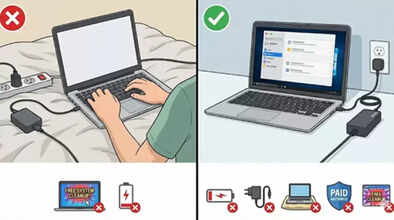
It often happens that while creating an important presentation at the office or during an online meeting, your laptop suddenly freezes, the fan starts making a loud noise, or the battery drains much faster than expected. At such times, we get frustrated and think that the laptop is old or has a major fault. However, the truth is that the root cause lies in our small, everyday bad habits. These habits damage both the laptop's performance and battery life. If you want your laptop to last for many years, it's crucial to change these habits in time.
1. Using the laptop on battery power
People often prefer to use their laptops on battery power and keep charging them repeatedly. But this habit reduces battery life. Experts say that if a power source is available, you should use the laptop while plugged in. Continuously discharging and recharging the battery quickly depletes its charging cycles, significantly reducing its lifespan. Modern laptops are capable of protecting the battery even when plugged in.
2. Avoid cheap or unbranded chargers
Never use cheap or unbranded chargers. These chargers are not built to quality standards and don't provide optimal charging speed. Unbranded chargers often have issues with fluctuating current, which can damage the laptop's battery and even risk burning out the motherboard. This could result in significant financial loss.
3. Don't use it directly on a bed or sofa
You should never use your laptop directly on soft surfaces like a bed or sofa. This blocks the ventilation ports at the bottom of the laptop, causing the device to overheat. Also, a large amount of dust can enter the computer from these surfaces, which can damage the hardware in the future.
4. Don't waste money on paid antivirus software
You don't need to install separate antivirus software for your laptop. These days, the antivirus software that comes pre-installed on laptops is sufficient to remove many types of viruses and malware. You just need to keep it updated regularly. Both Windows and Mac laptops come with free antivirus software that is usually enough to keep your device safe from viruses. Installing additional antivirus software can often slow down your laptop.
5. Be wary of free system cleanup advertisements
Never click on advertisements that claim to offer free system cleanup on the internet. These tools often display fake problems and then try to extort money from you to fix them. It's safest to use your laptop's built-in tools for system cleanup.
Disclaimer: This content has been sourced and edited from Amar Ujala. While we have made modifications for clarity and presentation, the original content belongs to its respective authors and website. We do not claim ownership of the content.
