
iPhone Tips: What is this 'black circle' near the phone's camera? You'll be amazed when you learn about its capabilities..
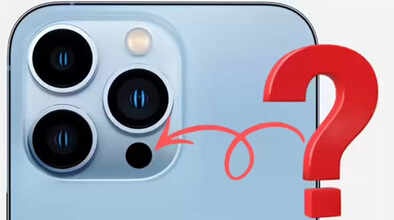
Have you ever noticed a small black circle near the camera on your iPhone? You'll find this on all iPhone Pro models, the ones with three cameras. Is it a hidden fourth camera, or something else? If you've ever wondered about this, let us tell you that it's not a camera, but a special sensor called a LiDAR scanner.
Most iPhone users are unaware of this amazing sensor and its capabilities. Let's tell you in detail about the features of this black circle next to the camera and what you can do with it.
What is the sensor next to the camera?
Apple has been including a black sensor with the camera system of its iPhone Pro models for a long time. It's called a LiDAR scanner. It's a type of sensor that uses laser technology to measure the distance and size of objects in front of it. It emits very fast beams of light, which are invisible to the naked eye.
When these beams of light hit objects and return to the sensor, it calculates their size and distance. This black circle near the camera helps improve your photos and videos, and is used for 3D mapping, accurate room measurements, better autofocus, AR effects, and shooting great photos and videos in low light.
In simple terms, it allows your phone to see things the way you see them with your own eyes. Let's explore all the things you can do with this LiDAR scanner.
Take photos in the dark.
Taking photos in the dark is usually difficult with your phone, but the LiDAR scanner makes it easier. With the help of this scanner, your phone can autofocus very easily and quickly. According to Apple itself, the LiDAR sensor allows the phone's camera to autofocus almost six times faster. This is especially useful when you need to quickly take a picture of something. The special thing about this sensor used in iPhones is that you don't have to activate it separately. When you click a picture with your phone's camera, it automatically activates and improves the output.
Measure things
With the help of the LiDAR sensor, you can measure objects around you with great accuracy. This is especially useful when you don't have any measuring tools. You can use your iPhone's built-in Measurement app for this. iPhones equipped with the LiDAR sensor can measure things with great precision.
Try out furniture at home.
If you are planning to buy furniture or other items for your home, you can use the LiDAR sensor on your phone to see how the item will look in your home.
In fact, on apps like Amazon, you can place 3D models of items in your home virtually, and the LiDAR sensor can be very useful for this. The LiDAR sensor shows very accurately how a 3D model will look in your room.
Enjoy VR games
iPhones with LiDAR sensors are very useful for gamers. You can play many VR games with their help. Thanks to the LiDAR sensor, these games provide a much better and smoother experience. On the other hand, if you play VR games on a regular phone, you may encounter various glitches and problems.
Scan your room
With the help of the LiDAR sensor, you can scan your room and create a 3D model of it. For this, you will need to use an app called Canvas: LiDAR 3D Measurements. After that, you can easily scan anything in your room and create a 3D model.
Disclaimer: This content has been sourced and edited from Navbharat Times. While we have made modifications for clarity and presentation, the original content belongs to its respective authors and website. We do not claim ownership of the content.
