
iOS 27 has transformed the iPhone experience; get ready for amazing features ranging from Siri to Photos..
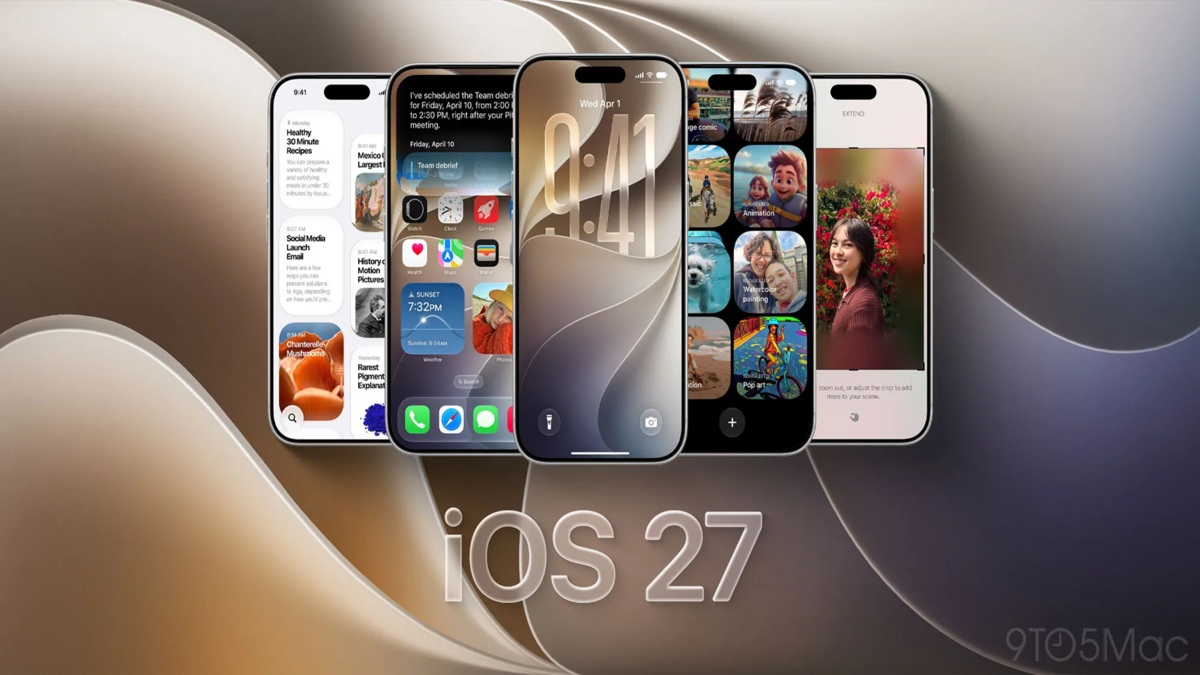
iOS 27 Features: Apple has released the iOS 27 update for iPhone users. The new operating system is available for the iPhone 11 and later models. It introduces several new "Apple Intelligence" features powered by AI, alongside Siri enhancements. Additionally, the update brings upgrades such as "Liquid Glass" interface changes, Visual Intelligence in the camera, AI tools for photo editing, and improved overall performance. If you own a supported iPhone, here are 10 features you can try out first.
**Faster iPhone Performance**
Apple has boosted the speed of various features in iOS 27. Post-update, animations are snappier, app launch times are faster, and AirDrop transfers complete more quickly. Improvements are also noticeable when taking photos, opening the keyboard, using the App Library, and navigating between Home Screen pages. iMessage syncing across devices has become more precise, and the system will automatically retry sending messages if an initial attempt fails. Switching between Wi-Fi and mobile networks is now smoother. Older iPhone models will also benefit from these performance improvements.
**Siri Gets AI Capabilities**
Siri has been significantly enhanced with AI in iOS 27. You can now engage in continuous conversations with Siri, and it can answer a wide range of questions—much like AI chatbots such as ChatGPT or Claude. Notably, Siri can accomplish more tasks by accessing your messages, emails, photos, apps, and other personal data. It can also search the web for information. You can activate Siri via voice commands, by swiping down from the middle of the screen to type a query, through the Siri app, or by pressing the side button. Siri can handle tasks like searching for emails, photos, and files; deleting items; creating shopping lists; and adding information to your contacts.
**Visual Intelligence in the Camera**
Visual Intelligence has been integrated into the Camera app in iOS 27. It can be accessed by swiping to the new mode alongside Photo and Video modes. This feature can identify objects within an image and provide information about them; for instance, you can ask for nutritional details about the food you are about to eat. Similarly, by taking a photo of a receipt, you can calculate how much each person needs to pay. Visual Intelligence offers a new way to access AI-driven information on the iPhone.
**AI for Everything from Writing to Photo Editing**
In iOS 27, Siri can help generate text from scratch. Using the "Write with Siri" feature directly from the keyboard, you can refine written text, alter its language and tone, and generate content tailored to your personal writing style; Siri can analyze your emails and messages to facilitate this. The iPhone will now also offer suggestions to correct both spelling and grammar. The "Clean Up" feature in the Photos app has been improved, allowing for more effective removal of unwanted objects and seamless filling of the resulting empty space. Additionally, AI tools such as "Extend" and "Reframe" have been introduced.
**Updates to Liquid Glass, Safari, and Home**
iOS 27 introduces a new slider for "Liquid Glass," allowing users to adjust the transparency or opacity of buttons, toolbars, and menus; this option can be found under Settings > Appearance > Liquid Glass. In Safari, custom extensions can now be created using natural language commands—enabling tasks such as generating webpage citations, setting focus timers, defining minimum font sizes, or altering a website's appearance. Safari can also automatically categorize tabs and notify you of changes to a webpage. The Home app now supports 2K and 4K recording for HomeKit Secure Video cameras and includes AI-powered text details and natural language search capabilities for video footage.
AirPods EQ and Shortcuts Made Easier
iOS 27 introduces new audio customization options for AirPods. Users can adjust mid, high, and low-frequency sounds according to their preferences. Custom EQ is available on AirPods 4, AirPods 5, AirPods Pro 2, AirPods Pro 3, and AirPods Max 2. The Shortcuts app has also been simplified; users can now describe the desired shortcut action in plain language, and AI will generate the shortcut for them. It can subsequently be modified via follow-up instructions or edited manually.
How to Install iOS 27
To install iOS 27, open the Settings app on your iPhone. Navigate to 'General' and tap on 'Software Update'. Once the iOS 27 update appears, you can download and install it. Apple will also send notifications to users prompting them to upgrade to the new operating system.
iPhones Compatible with the iOS Update
iPhone Duo
iPhone 18 Pro Max
iPhone 18 Pro
iPhone 17 Pro Max
iPhone 17 Pro
iPhone Air
iPhone 17
iPhone 17e
iPhone 16 Pro Max
iPhone 16 Pro
iPhone 16 Plus
iPhone 16
iPhone 16e
iPhone 15 Pro Max
iPhone 15 Pro
iPhone 15 Plus
iPhone 15
iPhone 14 Pro Max
iPhone 14 Pro
iPhone 14 Plus
iPhone 14
iPhone 13 Pro Max
iPhone 13 Pro
iPhone 13
iPhone 13 mini
iPhone 12 Pro Max
iPhone 12 Pro
iPhone 12
iPhone 12 mini
iPhone 11 Pro Max
iPhone 11 Pro
iPhone 11
iPhone SE (2nd generation and later)
Disclaimer: This content has been sourced and edited from TV9. While we have made modifications for clarity and presentation, the original content belongs to its respective authors and website. We do not claim ownership of the content.
