
Google Chrome’s New AI Browsing Feature Explained: How Gemini Can Surf, Click, and Complete Tasks for You
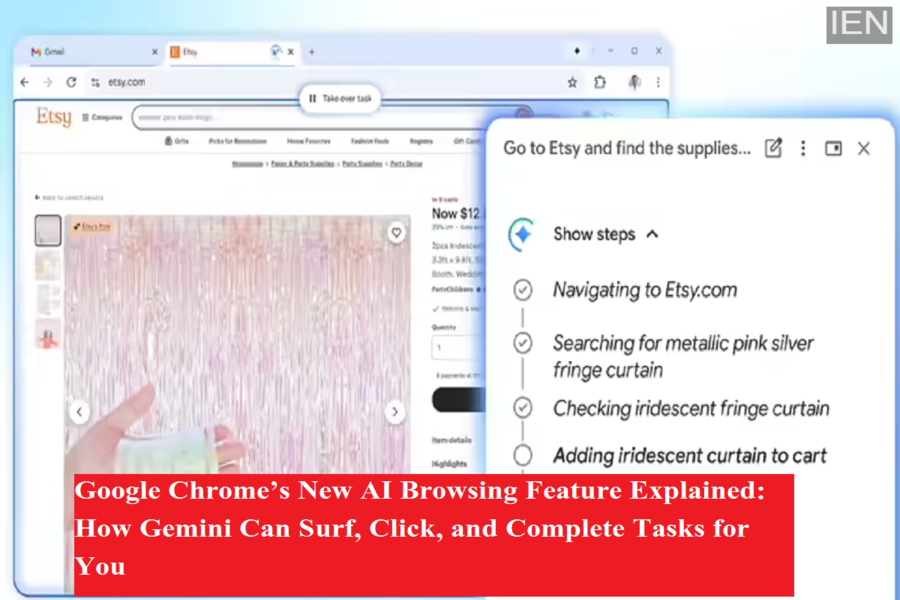
Google is pushing browser automation to a new level with the rollout of Auto Browse, an AI-driven capability in Google Chrome that allows artificial intelligence to navigate the web on a user’s behalf. Powered by Gemini 3, Google’s latest AI model, the feature can open websites, scroll pages, fill out forms, and handle complex, multi-step tasks with minimal user input.
Currently, Auto Browse is available only to AI Pro and AI Ultra subscribers in the United States, positioning it as a premium feature aimed at users who want hands-free web assistance.
What Is Auto Browse and How Does It Work?
Auto Browse can be described as a major upgrade over traditional autofill tools. Instead of merely entering saved details into forms, this feature allows Gemini to actively control a browser tab. Once activated through the Gemini sidebar in Chrome, the browser opens a separate tab marked with a visual indicator showing that AI is in control.
From there, Gemini performs actions just like a human user would. It scrolls through webpages, clicks links, types into fields, and moves step by step toward completing the assigned task. At the same time, users can watch everything unfold in real time through a side panel that explains each action the AI is taking.
Cloud-Based Processing and Privacy Considerations
Auto Browse relies heavily on Google’s cloud infrastructure. When Gemini interacts with a webpage, those interactions are processed on Google’s servers. According to Google, this activity may be stored or linked to a user’s account depending on individual privacy settings.
For tasks that require login details, Gemini can access Google Password Manager, but only after the user explicitly approves it. Importantly, Google has placed safeguards around sensitive actions. The AI will not finalize purchases, submit official forms, or post content online without user confirmation.
Usage Limits Based on Subscription Tier
Google has introduced daily usage caps to control how much Auto Browse can be used. AI Pro subscribers are limited to 20 tasks per day, while AI Ultra users can run up to 200 tasks daily. Each task can involve multiple steps, such as browsing several sites or comparing information across pages.
So far, Google has not confirmed whether Auto Browse will be available to free users or when it might expand beyond the US market.
What Can Gemini Do for You?
Google highlights a wide range of practical use cases. Auto Browse can compare hotel prices across different dates, fill out long online forms, search for service providers, manage subscriptions, or gather quotes. In demonstrations, Gemini has been shown reordering past purchases, searching for discount codes, and assisting with administrative tasks that usually take significant time.
The broader goal is to reduce repetitive browsing and allow users to focus on decision-making rather than manual navigation.
Who Is Responsible If Something Goes Wrong?
Despite the automation, Google makes it clear that responsibility still lies with the user. The company explicitly states that users are accountable for Gemini’s actions while Auto Browse is active. If the AI makes an error, selects the wrong option, or misunderstands instructions, the outcome is still considered the user’s responsibility.
Cybersecurity experts have also raised concerns about AI-driven browsing. One known risk is prompt injection, where malicious websites manipulate AI agents into performing unintended actions. While Google has implemented safety measures, the technology is not immune to such threats.
The Bigger Picture: Competition and the Future of AI Browsing
Auto Browse arrives at a time when competition in AI-powered browsing is heating up. Rivals such as OpenAI and Perplexity are developing similar agent-based browsers that aim to automate online tasks. Google is also supporting the Universal Commerce Protocol, a new standard created with major retailers to help AI agents interact more smoothly with online stores.
Whether users will fully trust AI to browse, compare, and act on their behalf remains uncertain. However, Auto Browse marks a significant step toward a future where browsing the web could become more conversational—and far less manual.
