
Google App Icons: Google Apps to Get a New Avatar! The Old Four Colors Are Gone, Replaced by a New 'Gradient' Look..
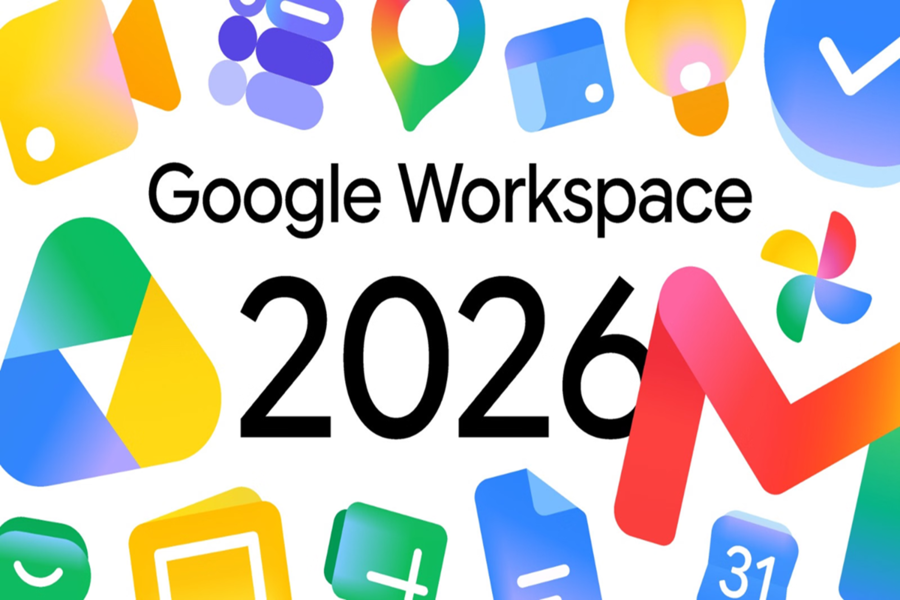
Towards the end of 2025, Google began rolling out some of its icons with a new 'gradient' design. Now, reports suggest that this fresh new look is set to arrive across the rest of Google's apps as well. According to a report, Google may soon retire its old, circular, and frankly boring four-color design. If you, too, often find yourself confused by the nearly identical icons of Google apps, there is good news in store for you. Let's take a look at which app icons are slated for a change...
Why Was This Change Made?
Essentially, the biggest issue with Google's previous icon set was that almost every app utilized the company's signature four colors (red, blue, green, and yellow). Due to this uniformity, all the icons looked largely alike, making it quite challenging for users to distinguish them at a glance. To address this specific complaint, Google has now done away with that old design convention.
In the new redesign, each app has been assigned a distinct color and a unique shape to ensure easy identification. Furthermore, the background elements behind the icons have been removed to give them a larger and more unique appearance than before. As a result, they now look even cleaner and more modern.
What Is the New Design Like?
Google's new design is quite soft and visually appealing. The corners of the icons have been made significantly rounder than before to give them a modern aesthetic. Google has also introduced major changes regarding color schemes; the icons now feature colorful gradients—a beautiful blend ranging from soft pastel shades to Google's deeper primary colors.
Notably, this new look isn't merely for aesthetic purposes; it also serves as a visual cue for the advanced AI features embedded within these apps. We have already caught a glimpse of this transformation on platforms such as the Google App, Gemini, Photos, and Maps.
Let's see what has changed in each specific app:
Google Drive: The color red has been completely removed from the new icon. It will now feature only the classic green, yellow, and blue colors. Its outer shape resembles a rounded triangle, with a pointed triangle situated right in the center.
Google Docs, Sheets, and Slides: As before, these apps will each feature a single primary color. The Docs icon still resembles an upright sheet of paper. However, the Sheets and Slides icons will now appear in a landscape orientation—a design choice that effectively reflects the actual usage of these applications.
Google Meet and Chat: The Google Meet icon has undergone a significant transformation. While it still depicts a camera, its primary color has now been changed to yellow. Meanwhile, the Google Chat icon has taken the shape of a pill-like message bubble featuring a charming smiley face; its green hue serves as a nostalgic nod to the legacy Google Hangouts service.
Gmail: Its iconic 'M' letter-shaped envelope remains largely unchanged, save for a slightly more rounded aesthetic. Its primary color is red. Most interestingly, among all the newly redesigned apps, Gmail stands out as the sole application that retains all four of Google's signature colors—red, yellow, green, and blue.
Google Calendar: The Calendar icon has reverted to its classic blue, flip-style avatar. The previous multi-colored box design has now been retired.
Google Tasks: It still features a checkmark, but the icon now resembles a rounded button—much like one you would tap to mark a task as complete. Much like the Calendar icon, its primary color has been designated as blue.
Google Voice: Its overall shape remains consistent with the previous version, though it now features slightly softer, more rounded contours. Its light green color harmonizes with the Google Chat palette, underscoring its primary function as a tool for calling and business communication.
Google Forms and Sites: The Forms icon will no longer feature the sheet-of-paper motif; instead, it will display a series of circular "multiple-choice" bubbles, though its signature purple color remains unchanged. Conversely, the color scheme for Google Sites has been updated, shifting from a deep navy blue to a lighter shade of blue.
Disclaimer: This content has been sourced and edited from Amar Ujala. While we have made modifications for clarity and presentation, the original content belongs to its respective authors and website. We do not claim ownership of the content.
