
DigiLocker: Have you accidentally installed a fake DigiLocker app? Your documents could be stolen..
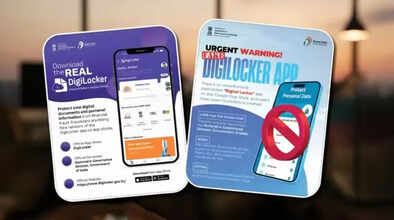
If you are also using the DigiLocker app, then this news is for you. This trusted digital wallet app, issued by the Government of India, offers many features, allowing you to safely store sensitive documents such as your driving license, RC, Aadhaar, PAN, and mark sheets. However, nowadays, cybercriminals are creating fake DigiLocker apps that look like the real ones to steal people's data, identity, and banking information. Recently, the Ministry of Electronics and Information Technology (MeitY) also issued a warning about this, stating that several fake DigiLocker apps are available on the Google Play Store, whose sole purpose is fraud. Let's first understand the risks associated with fake DigiLocker apps...
What are the risks of fake DigiLocker apps?
The biggest risk of a fake DigiLocker app is identity theft. Your Aadhaar, PAN, and other IDs can fall into the hands of scammers. It can also lead to UPI/net banking fraud using your financial information. A fake DigiLocker app can also install malware on your device. Additionally, fake loans or SIM cards could be issued in your name. The stolen data could even be sold on the dark web.
How to identify the real DigiLocker app?
First, check the app's developer name.
The real developer's name should be National e-Governance Division (NeGD) or the Government of India.
If the developer name of any app is different, then the app is 100% fake.
Install the app only from the official website.
Check the app's downloads, as the real app has millions or even billions of downloads.
What to do if a fake DigiLocker app is installed?
If a fake DigiLocker app is installed, uninstall it immediately.
Then check if the app has taken permissions like camera/messages/storage/microphone.
After that, change the passwords for DigiLocker, Aadhaar, banking, and email accounts.
After doing all this, scan your phone with a good anti-malware program. If you notice any suspicious activity, report it to www.cybercrime.gov.in or call the helpline number 1930.
How to avoid fake DigiLocker scams?
First, check the reviews and the developer before downloading the app.
Never grant any unnecessary permissions to the app.
Keep your phone and apps updated regularly.
Avoid uploading documents to any third-party apps.
Always verify any links in SMS/emails/WhatsApp messages before clicking on them.
Always keep Two-Factor Authentication enabled on your account.
Also read - What is an electric blanket? How safe is it, and how to use it in winter?
Disclaimer: This content has been sourced and edited from Dainik Jagran. While we have made modifications for clarity and presentation, the original content belongs to its respective authors and website. We do not claim ownership of the content.
