
Ayushman Card e-KYC 2026: Avoid These Photo Mistakes or Your Card Approval May Be Delayed
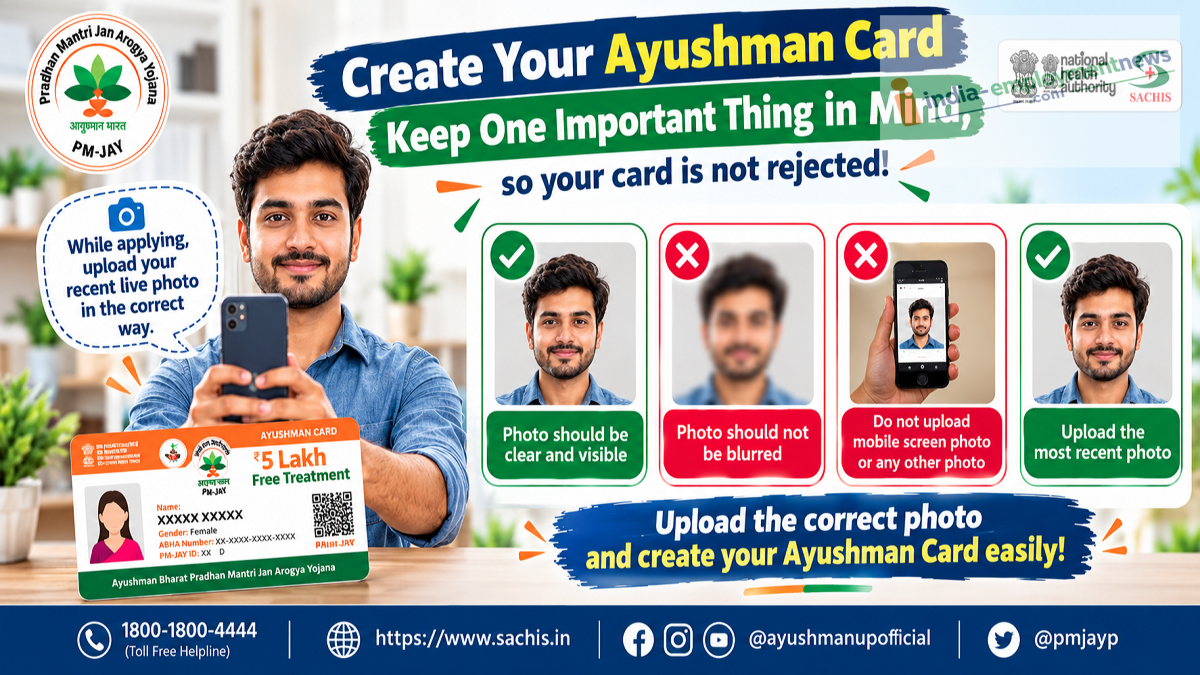
Ayushman Card Update 2026: People applying for an Ayushman Card should take special care while completing their electronic Know Your Customer (e-KYC) verification. A recent public advisory has highlighted the importance of uploading a clear, properly captured live photograph during the verification process.
Applicants have been advised to avoid blurry images, low-quality photographs and pictures taken from another mobile phone's screen.
An unclear photograph may create problems during identity verification and could delay the processing of an Ayushman Card application.
The advisory also shares a toll-free assistance number, 1800-1800-4444, for people who need help with the process.
Here is what applicants should know about Ayushman Card e-KYC, photo requirements and the steps to follow for successful verification.
Why Is e-KYC Important for an Ayushman Card?
Electronic Know Your Customer, commonly known as e-KYC, is an identity verification process used to confirm a beneficiary's details.
Under the Ayushman Bharat Pradhan Mantri Jan Arogya Yojana (AB PM-JAY), eligible individuals may need to complete e-KYC before their Ayushman Card can be generated.
The verification process helps establish that the applicant's identity matches the relevant beneficiary record.
Depending on the applicable procedure, this may involve identity information, authentication and a live photograph.
Applicants should follow the instructions provided by the official portal or authorised verification operator.
Ayushman Card Photo Rules: What Applicants Should Remember
The latest advisory emphasises that the photograph uploaded during e-KYC should be clear and of good quality.
Applicants should ensure that their face is properly visible and that the photograph is captured directly through the required verification process.
Important Photo Precautions
| What to Do | What to Avoid |
|---|---|
| Capture a clear live photograph | Uploading a blurry image |
| Keep your face clearly visible | Using a poorly lit photograph |
| Follow the official camera instructions | Photographing another mobile screen |
| Use a sharp, good-quality image | Uploading an unclear or distorted picture |
| Review the image before submission | Submitting a photo in which the face is difficult to identify |
Following these precautions can help reduce avoidable verification difficulties.
Why Should You Not Upload a Photo From a Mobile Screen?
The advisory specifically warns applicants against uploading a photograph captured from another mobile phone's screen.
Such images may contain reflections, glare, distorted colours or reduced image quality.
They may also fail to meet the requirements of a live-photo verification process.
A photograph displayed on another screen is not the same as capturing the applicant's face directly through the authorised camera interface.
For this reason, applicants should use the official live-photo capture process rather than attempting to submit a picture of an existing photograph.
How to Take a Clear Live Photo During e-KYC
Applicants can follow these simple precautions while completing the photo-verification step.
Step 1: Choose a place with sufficient lighting.
Step 2: Position your face clearly in front of the camera.
Step 3: Keep the camera steady to avoid a blurred image.
Step 4: Make sure your face is not hidden by shadows or other obstructions.
Step 5: Follow any on-screen instructions provided by the official verification system.
Step 6: Check the captured photograph before submitting it, if the system allows a preview.
Step 7: Complete the remaining verification steps as instructed.
Applicants should avoid using filters or edited photographs when the system requires a live image.
Can a Blurry Photo Delay Ayushman Card Approval?
A poor-quality photograph can create difficulties during identity verification.
If the uploaded image does not meet the applicable verification requirements, the applicant may be asked to repeat the process or provide a better image.
However, a blurry photograph does not automatically mean that every application will be rejected.
The outcome depends on the verification system and the relevant authority's assessment.
Applicants should check the application status through the official beneficiary portal if their card is not generated after submission.
How to Complete Ayushman Card e-KYC Online
Eligible beneficiaries can access supported card-generation services through the official Ayushman Bharat beneficiary portal.
Step-by-Step Process
-
Select the available beneficiary login option.
-
Complete the required mobile or identity verification.
-
Search for the eligible beneficiary record.
-
Select the relevant family member.
-
Start the e-KYC process where available.
-
Complete the required authentication and live-photo capture.
-
Submit the details for verification.
-
Check the card status and download the Ayushman Card when approved.
The exact procedure may vary depending on the beneficiary category and the portal's current interface.
Some applicants may need assistance from an authorised operator or service centre.
Can You Complete e-KYC Through the Ayushman App?
The official Ayushman App also supports beneficiary-related services, including applicable identity verification and card-generation facilities.
Applicants can download the official application from the Google Play Store.
They should verify that they are installing the genuine government-supported application.
After logging in, eligible users can follow the available instructions for beneficiary verification.
If the app requests a live photograph, users should capture it directly through the required process.
They should not attempt to bypass the live-photo requirement by photographing an image displayed on another device.
Who Can Get an Ayushman Card?
Ayushman Card eligibility depends on the applicable government beneficiary records and scheme conditions.
Under the standard PM-JAY framework, eligible families receive health coverage of up to ₹5 lakh per family per year for specified hospitalisation services.
The government has also expanded coverage for eligible senior citizens aged 70 years and above under the Ayushman Vay Vandana initiative.
However, completing e-KYC does not automatically make an otherwise ineligible person eligible for PM-JAY.
Applicants must satisfy the relevant eligibility conditions.
Ayushman Card e-KYC: Important Details
| Particulars | Information |
|---|---|
| Scheme | Ayushman Bharat PM-JAY |
| Process | Electronic Know Your Customer verification |
| Important requirement | Clear, properly captured live photograph |
| Photos to avoid | Blurry images and photos taken from another mobile screen |
| Official beneficiary portal | beneficiary.nha.gov.in |
| Mobile application | Ayushman App |
| Helpline shared in advisory | 1800-1800-4444 |
What Should You Do If e-KYC Fails?
If the verification process fails, applicants should first check whether the photograph was captured correctly.
They should also ensure that their identity details match the beneficiary information.
A poor internet connection, incomplete authentication or technical problem may also interrupt the process.
If the issue continues, applicants can seek help through official Ayushman Bharat support channels.
They should avoid repeatedly sharing personal information with unknown individuals offering unofficial verification services.
Ayushman Card Helpline Number
The public advisory has shared the following toll-free number for assistance:
1800-1800-4444
Applicants can use the number for guidance, subject to its applicable service coverage.
The national PM-JAY helpline is also available at 14555 for scheme-related assistance.
The official beneficiary portal is:
https://beneficiary.nha.gov.in/
Applicants should confirm the appropriate support channel through official government communications.
Beware of Fake Ayushman Card Verification Links
Fraudsters sometimes circulate messages claiming that an Ayushman Card will be blocked unless the recipient completes verification through an unfamiliar link.
Applicants should not share OTPs, UPI PINs or banking passwords with unknown callers.
They should use only authorised government portals and applications.
No one should be given remote access to a phone or banking application for routine Ayushman Card e-KYC.
Final Update
A clear live photograph is an important part of the Ayushman Card e-KYC process.
Applicants should ensure that their photograph is sharp, properly captured and suitable for identity verification.
They should avoid uploading blurry images or photographs taken from another mobile phone's screen.
Following the official photo-capture instructions can help prevent avoidable verification problems and delays in Ayushman Card generation.
For assistance, applicants can use the toll-free number 1800-1800-4444 shared in the advisory or consult the official Ayushman Bharat beneficiary portal.
Disclaimer: Photo-verification requirements and card-generation procedures may vary according to the applicable government system. Applicants should follow the latest instructions displayed on official portals.
